A Mobile App Built for the Way Doctors Actually Work

The SkyLIMS+ Doctor App is Mukon’s next-generation mobile application for clinicians — a simplified, focused experience for looking up results and placing orders, wherever the doctor happens to be.
Contact Us to Learn More → Back to SkyLIMS+ Overview
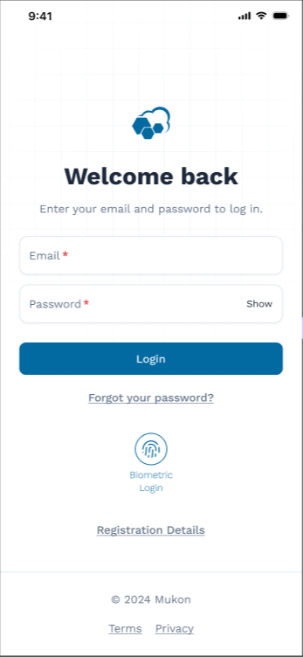
SkyLIMS+ Doctor App login screen with biometric sign-in

Keeps Working, Even When SkyLIMS Doesn’t

The app captures and stores requisition data sent from SkyLIMS as it becomes available, allowing it to run independently from SkyLIMS.

Our distributed design approach means your referring clinicians can still access results during SkyLIMS maintenance or offline periods — improving their experience and keeping service disruptions to a minimum.

Distributed by Design

Requisition data is stored on-device as it arrives, so the app doesn’t depend on a live connection to SkyLIMS to stay useful.

Fewer disruptions for your referring clinicians means a better experience for your laboratory’s brand.

Results and Orders, Simplified

Three core workflows, redesigned around what a busy referring clinician actually needs.

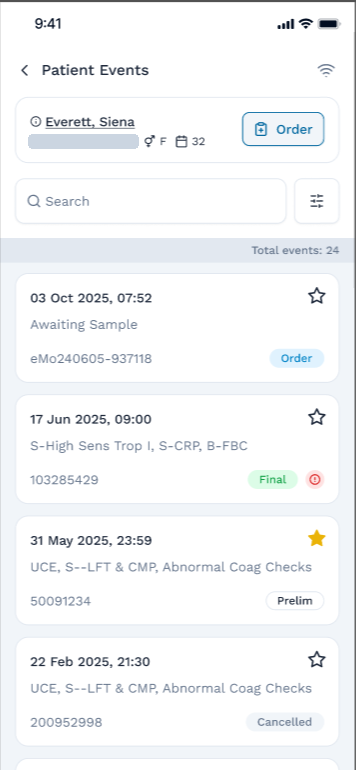
Improved Patients & Events View

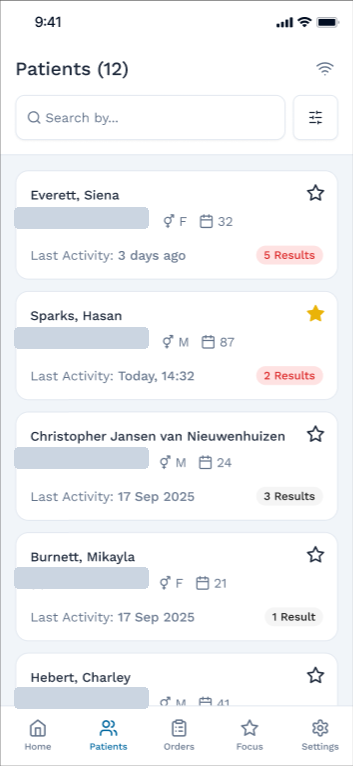
Easy navigation between patients, with focus on new activity and quick indicators on unread results. Patient events combine both episodes and orders in one simplified view.

  • Quickly see all your patients with the latest activity
  • Unread indicators for results, with the ability to flag a patient for focus
  • See the latest events (episodes and orders) for a patient in one timeline
  • View a patient’s information by tapping on their name
SkyLIMS+ Doctor App patients list with unread result indicators
SkyLIMS+ Doctor App patient events combining episodes and orders

Enhanced Cumulative Display & Result History

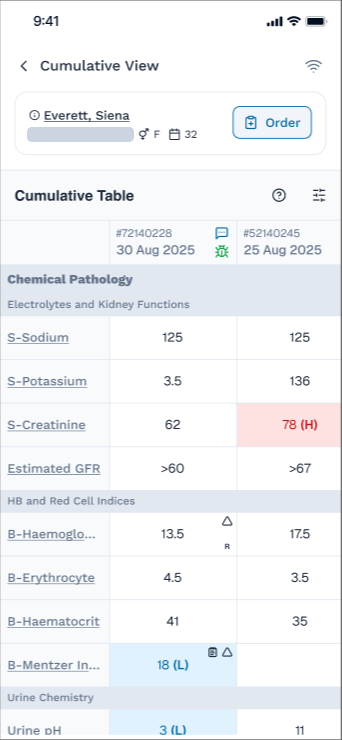
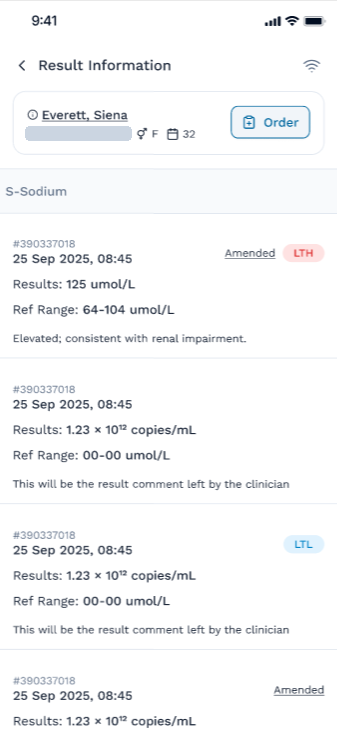
A new, interactive cumulative view lets the clinician see a true cumulative of the patient’s results, with the ability to focus on a specific test and its full result history.

  • Interactive, in-app cumulative grid with the full patient history
  • Test-specific result history accessible directly from the cumulative grid
  • Reference ranges and flags shown alongside every result
SkyLIMS+ Doctor App interactive cumulative results grid
SkyLIMS+ Doctor App test-specific result history

Quick & Easy Order Placement

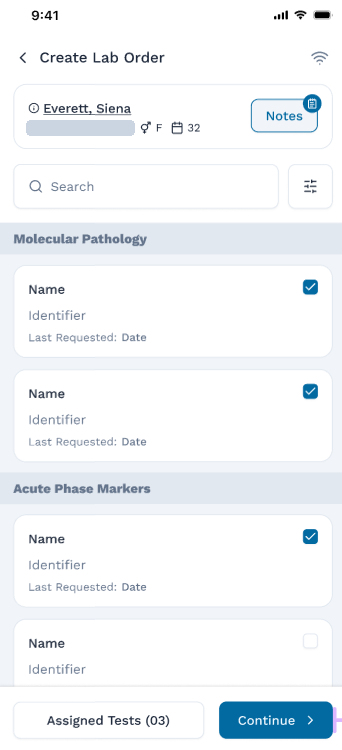
A simplified workflow guides the clinician through placing an order for a new or existing patient, without slowing them down.

  • Search and select tests by name, synonym, or discipline
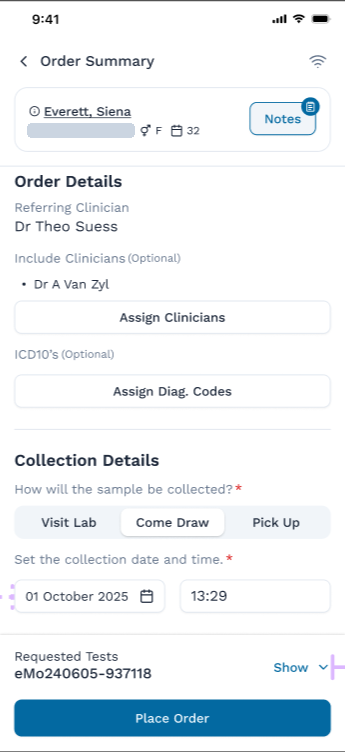
  • Specify additional details and choose a collection method — visit lab, come draw, or pick up
  • Assign clinicians and ICD-10 diagnosis codes to the order
  • Review and place the order from a clear order summary
SkyLIMS+ Doctor App test search and selection when creating an order
SkyLIMS+ Doctor App order summary with collection details

Everything Else Clinicians Have Asked For

Notifications & Messages

The laboratory can send notifications and messages directly to their clinicians through the app.

A Focused List

Clinicians can add patients or requisitions to a focused list, for quick access and special attention.

Biometric Login

Easy, secure login with biometrics — no need to re-enter a password every time.

Performance & Security

Enhanced application performance and security, built on modern, actively maintained foundations.

Customisable Settings

Settings to tailor the app’s behaviour to each clinician’s needs.

Continuous Improvement

An ongoing roadmap of new functionality, aimed squarely at improving the clinician’s experience.

A Simplified, More Cost-Efficient Deployment

To make the app more affordable and pave the way for more frequent updates, it will be deployed as a single SkyLIMS+ application in the app stores — managed from Mukon’s own developer accounts on Google Play and the Apple App Store.

This focused approach significantly speeds up development cycles and ensures your clients can get the newest features sooner. It also means Mukon manages the app store administration for you, and removes the individual Apple developer licence that laboratories currently pay for.

What This Means for Your Clients

Your referring clinicians will download the SkyLIMS+ app from the app store. Once they register and log in, they’ll be presented with your laboratory’s own branding and reports.

If a clinician is registered at more than one laboratory, they’re shown a lab-selection screen after logging in. The laboratory is set for that session at login — they can’t switch between laboratories while already in the app.

What’s Next

The single, shared SkyLIMS+ app lets us deliver enhanced functionality to your clients faster and more cost-efficiently. Some of what we’re considering for future releases:

Clinician-defined test reflex conditions, based on test results.

Clinician-defined test profiles to order multiple tests with one tap — e.g. a “Diabetes profile” covering a Lipogram, Glucose, and HbA1C.

Fund-dependent chronic-disease-management guidance, to help advise the doctor on requesting the right tests at the right time.

AI-assisted test suggestions, based on the tests already selected.

The ability to integrate with third-party applications.

Plans are subject to re-assessment by Mukon based on the requirements of our clients.

Common Questions

Where will the data and API be hosted for the SkyLIMS+ app?

Mukon will host and maintain the data and API. While this adds more responsibility for us, it greatly simplifies maintenance and gives us better control and consistency — allowing our infrastructure team to focus on best practices we can control directly.

How will the SkyLIMS+ deployment work?

Store deployment is costly in terms of developer time, and there are frequent issues with changes to store rules and requirements. Deploying independently for each Mukon client at interface-licence cost isn’t feasible long term, so instead we do a single deployment that can connect to any client. This greatly reduces the number of in-store applications we need to maintain, opening up more time for development instead.

What if the doctor is a client at multiple laboratories?

If a clinician is registered at multiple laboratories, they’re shown a lab-selection screen after logging in. The laboratory (tenant) is set at that login and can’t be switched while already in the application — they would need to log in again to change laboratories.

More information still to come: the clinician registration process, beta testing plans, and more FAQs.

Want Early Details on the Doctor App?

Get in touch with Mukon Informatics to learn more about the SkyLIMS+ Doctor App and its development progress.

Contact Mukon Informatics → About SkyLIMS+